
Why the Arlo Essential 3rd Gen (2025) Changes the Entry-Level Game
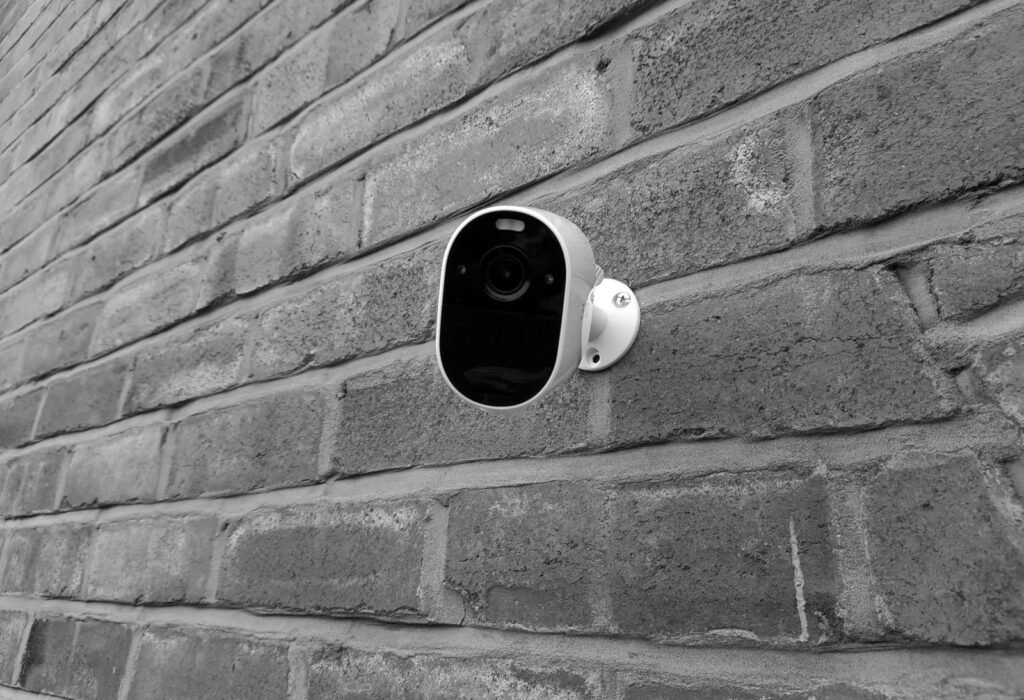
The Arlo Essential security camera series has consistently exceeded expectations, and the 3rd Gen 2025 model significantly raises the bar for entry-level security solutions. Many users have struggled with the grainy footage of older 1080p cameras, which often fail to capture crucial details like license plates or facial features. This model, however, offers 2K resolution powered by a 4-megapixel image sensor, delivering the clarity needed to eliminate those frustrations.
From my personal experience, setting up security cameras can be a cumbersome process, especially when a separate hub is involved. This often leads to unnecessary complexity and expense. The Arlo Essential 3rd Gen 2025 simplifies this with its direct Wi-Fi connectivity, removing the need for a hub altogether. Additionally, frequent ladder climbing to charge or adjust cameras positioned in challenging spots can be a daunting task. Thankfully, the new model’s extended battery life and straightforward setup alleviate these issues, making it a game-changer for homeowners seeking hassle-free security.
Is Arlo Essential a Good Camera? Performance vs. Price
The Arlo Essential Wireless Security Camera delivers genuine surveillance capability at an entry-level price — and the performance data backs that up.
A 130-degree field of view covers most entryways completely, capturing the full width of a standard doorframe plus surrounding approach areas without requiring a second camera. PCMag notes the Essential also offers 1080p or 2K HD video combined with 12x digital zoom, meaning distant detail — a license plate, a package label — remains legible when you punch in. For comparison, the Pro 4’s 160-degree view adds peripheral coverage that matters on wide driveways or open yards, but for a focused entryway deployment, that extra 30 degrees rarely changes what you actually capture.
Color night vision is where the integrated spotlight earns its place. Without a spotlight, budget cameras default to grainy black-and-white infrared footage that makes identifying clothing color or facial features nearly impossible. The Essential’s built-in spotlight floods the scene with visible light the moment motion triggers, producing full-color footage in conditions where it genuinely matters. As Digital Camera World puts it, the camera features “laser-sharp motion detection, and smart features that actually matter.”
Motion detection accuracy is a practical differentiator. The Essential’s AI-powered detection filters people and animals from wind-blown foliage or passing headlights, reducing the alert fatigue that makes homeowners start ignoring notifications altogether. In practice, this means fewer false triggers overnight — a meaningful quality-of-life improvement over basic motion-sensor alternatives.
That performance-to-price balance is compelling on its own, but battery life is the variable that determines whether this camera works for you long-term — which is exactly where the XL model enters the conversation.
The XL Advantage: Solving the 24-Month Battery Challenge

The XL model’s defining edge is simple: it keeps recording long after the standard model needs a recharge. For homeowners who want a truly low-maintenance setup, that distinction matters more than almost any spec on the box.
According to Arlo, the XL’s integrated battery is engineered to last between 16 to 24 months under typical usage conditions — roughly double what the standard model delivers in comparable conditions. That gap is significant when you factor in cameras mounted in hard-to-reach spots like rooflines, garage soffits, or second-story corners.
Battery specs at a glance:
- Standard Essential 3rd Gen: Rechargeable battery optimized for regular rotation
- Essential XL (2nd Gen): Integrated battery rated for 16–24 months of typical use
- Trade-off: The integrated design means the battery isn’t user-removable — you charge in place rather than swapping packs
That non-removable design is worth understanding before you commit. In practice, it simplifies the ownership experience for most users, but it does mean you’ll want to plan your Arlo camera setup with charging access in mind from the start.
Best For — XL Model:
- High-traffic entry points like front doors and driveways
- Locations where ladder access is inconvenient or seasonal
- Renters or homeowners who want minimal maintenance windows
The XL is purpose-built for durability over flexibility. If your priority is a camera that simply stays on without frequent intervention, the XL’s extended battery life makes it the stronger choice — and understanding that before installation sets you up for success, which is exactly where smart placement strategy comes in.
Mastering Arlo Camera Set Up and Connectivity
Setting up Arlo cameras correctly from the start is what separates a smooth, reliable system from one that keeps dropping offline. The 3rd Gen Essential streamlines the pairing process considerably, but knowing what to expect at each step makes the whole experience faster and less frustrating.
The Arlo app guides you through pairing in a logical sequence:
- Download the Arlo app and create or log into your account.
- Tap “Add Device” and select the Essential camera from the product list.
- Scan the QR code on the camera housing to initiate the connection handshake.
- Select your Wi-Fi network — here’s where the 3rd Gen’s Dual-Band Wi-Fi matters most.
- Confirm the sync and name your camera by location.
Dual-Band Wi-Fi support (2.4GHz and 5GHz) is arguably the most underrated upgrade in this generation. The 2.4GHz band covers longer distances through walls; the 5GHz band delivers faster, less congested throughput for cameras near your router. Having the option to choose prevents the dropped-connection frustration common with single-band models.
Common connection issues during initial sync typically fall into three categories: the camera placed too far from the router, the phone’s Bluetooth disabled (required for handshake), or a 5GHz-only network that the app defaults to incorrectly. Switching to 2.4GHz usually resolves the last issue immediately.
Placement directly shapes performance. The 130-degree field of view covers a wide area, but mounting the camera 7–10 feet high and angling it slightly downward maximizes motion detection accuracy while reducing false triggers from passing cars or swaying branches. Corner mounting is particularly effective — it doubles the coverage zone a single camera can monitor.
If you ever need to move the camera to a new location or switch networks, the process requires a full reset and re-sync — something the next section walks through in detail.
How to Reset Arlo Camera for a Fresh Start
Knowing how to reset Arlo camera correctly is the fastest way to resolve persistent connectivity issues, prepare for a move, or hand the system off to a new owner.
The reset button is small but important. On the 3rd Gen Essential, you’ll find the sync/reset button on the bottom of the camera housing. Pressing it briefly triggers a soft reboot — the camera restarts without wiping any settings or unlinking from your Arlo account. That’s the right move when the camera is sluggish or momentarily offline.
A factory reset is a different story. A factory reset returns the camera to its default settings and removes it from your Arlo account entirely, according to Arlo Support. To trigger it, hold the reset button for roughly 10 seconds until the LED flashes amber. This wipes saved clips, network credentials, and account links — so only proceed when you genuinely need a clean slate.
The three most common reasons to factory reset are switching to a new Wi-Fi network, relocating to a different home, or dealing with a camera stuck in a persistent offline state that a soft reboot couldn’t fix. In each case, the process is the same: reset, then re-add the camera through the Arlo app as if it were brand new.
Re-syncing after a reset is straightforward. Open the Arlo app, tap “Add Device,” and follow the on-screen prompts. The 3rd Gen’s dual-band Wi-Fi support — covered in the previous section — means reconnecting to a 5GHz network is now a realistic option, which can reduce interference during the re-pairing process.
Once setup is complete, all the performance advantages discussed throughout this article come back online immediately — and the decision of which model and plan works best for your home becomes the final piece of the puzzle.
The Bottom Line: What You Need to Know
The 2025 Arlo Essential 3rd Gen consolidates everything a modern homeowner needs — 2K resolution, hub-free Wi-Fi connectivity, and smart home compatibility — into one of the most accessible security cameras on the market today.
The 3rd Gen’s direct Wi-Fi connection is its most underrated advantage, eliminating the hub dependency that made earlier setups more complicated. Compared to the Arlo Essential 2K 2nd Gen, the newest generation adds dual-band Wi-Fi support, which noticeably reduces the dropped connections and pairing frustrations that plagued older models during initial setup.
- 2K video without a hub. The Arlo Essential 3rd Gen delivers sharp, detailed footage at a price point that doesn’t require a subscription to justify the hardware cost.
- XL battery model for low-maintenance coverage. If climbing a ladder twice a year sounds like two times too many, the XL variant offers up to two years of battery life on a single charge.
- Dual-band Wi-Fi means fewer headaches. Setup reliability improves significantly when a camera can negotiate between 2.4GHz and 5GHz bands depending on signal conditions.
- Broad smart home compatibility. Alexa, Google Assistant, and IFTTT integrations mean this camera fits cleanly into whatever ecosystem you’ve already built.
In practice, these four factors work together to make the 3rd Gen the clearest value in Arlo’s current lineup. With setup and reset best practices already covered, the final question worth asking is how to make the most of this hardware long-term — which is exactly where expert guidance becomes the differentiating factor.
Securing Your Future with Hyvoxa and Arlo
With over a decade of experience in DIY security, I’ve found that the right tools and strategies can make all the difference. The Arlo Essential 3rd Gen 2025 is more than just a camera; it’s a vital component of a smart security system. Its 2K resolution and hub-free design are standout features that simplify installation while enhancing security.
For those considering the XL model, my advice is straightforward: if you’re looking to minimize maintenance, especially in hard-to-reach areas, the extended battery life is invaluable. It’s designed for those who want reliable, long-term security without frequent interventions.
Another critical aspect of securing your home is conducting a Wi-Fi audit. Ensuring your network is robust enough to handle multiple devices without interruption is crucial. Use dual-band capabilities to optimize performance and reduce interference.
As someone who has navigated the complexities of home security over the years, I recommend assessing your property’s unique needs before purchasing. Whether it’s determining the number of cameras required or identifying optimal placement, a tailored approach ensures comprehensive coverage and peace of mind.
In the end, the Arlo Essential 3rd Gen offers a compelling mix of features and ease of use. By leveraging expert insights and practical experience, you can effectively secure your home with confidence and simplicity.