
The Mesh Network Reality Check
Most smart home problems aren’t device problems — they’re network architecture problems hiding in plain sight.
If your smart lights occasionally miss commands, your smart locks respond slowly, or your automations feel unreliable, the instinct is to blame the devices. In practice, the real culprit is often a Wi-Fi network stretched well beyond its intended purpose. Every smart bulb, sensor, and switch you add to your home network compounds congestion, and Wi-Fi was simply never designed to manage dozens of low-power, always-on IoT devices alongside your laptop, TV, and cell phone.
Offloading smart devices to a dedicated protocol is the single most effective way to stabilize both your smart home and your Wi-Fi network simultaneously. When you move sensors, switches, and locks onto their own communication layer, your router stops juggling dozens of competing connections and your smart devices gain a network purpose-built for their needs.
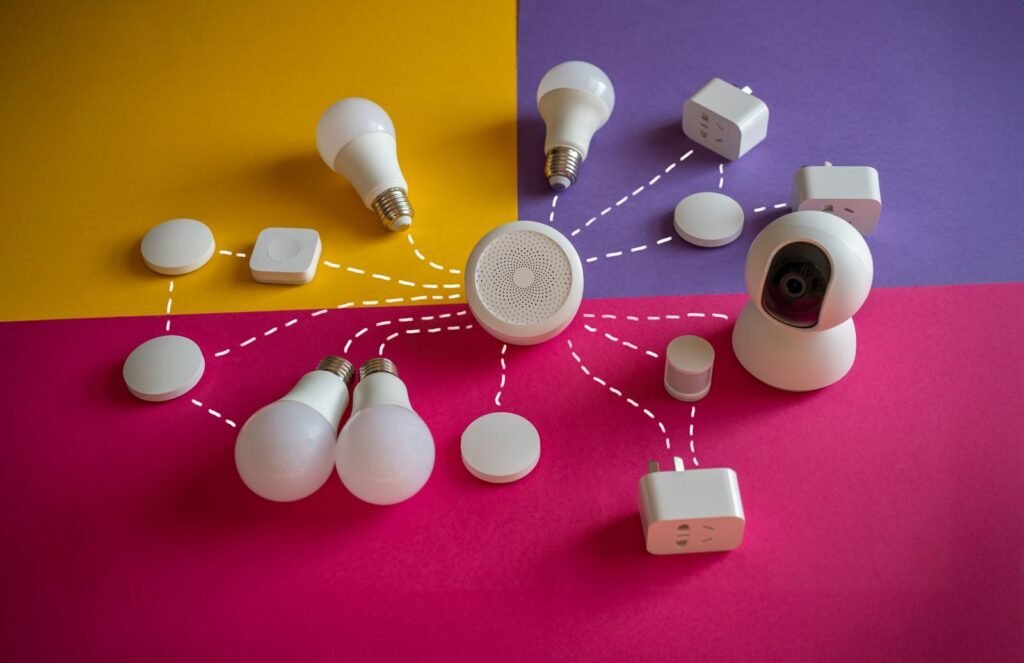
This is where mesh networking becomes the defining concept. Unlike a traditional hub-and-spoke setup where every device connects directly back to a central point, a mesh network turns each device into a relay. As Security.org notes, mesh networks allow devices to pass signals to one another, extending range beyond the central hub’s reach. A signal can hop from a light switch in your kitchen to a sensor in your garage — even if neither is within direct range of your hub. The network is also self-healing: if one device goes offline, signals automatically reroute through available nodes.
Two protocols have emerged as the dominant non-Wi-Fi standards built on this mesh architecture — Zigbee and Z-Wave. The ongoing Zigbee vs Z-Wave conversation isn’t really about picking a winner. It’s about understanding where each technology excels, starting with one of the most consequential technical differences: the radio frequency each protocol uses.
Frequency and Interference: The Sub-GHz Advantage
Radio frequency choice is one of the most consequential — and least discussed — differences between Zigbee and Z-Wave in any mesh network technology deployment.
Z-Wave’s 908.42 MHz frequency in the US is a deliberate design decision, not an arbitrary spec. By operating below 1 GHz, Z-Wave sidesteps the notoriously congested 2.4 GHz band entirely. According to Security.org, this lower frequency also delivers a meaningful range advantage — approximately 30–100 meters per hop indoors. Lower frequencies travel farther through obstacles like drywall, wood framing, and furniture because longer radio waves lose less energy diffusing around physical barriers.
📡 The 2.4 GHz Traffic Jam The 2.4 GHz band is shared by Wi-Fi (channels 1–11), Bluetooth, microwave ovens, baby monitors, and Zigbee — all competing for the same airspace simultaneously. In a typical apartment with neighbors on multiple sides, a single floor can carry dozens of overlapping Wi-Fi networks alone. Zigbee carves out channels 11–26 within this band, but overlap with Wi-Fi channels 1, 6, and 11 is nearly unavoidable without deliberate configuration.
Zigbee’s 2.4 GHz operation isn’t a fatal flaw, but it does require active management. The practical mitigation is straightforward: map your Wi-Fi channels first, then assign your Zigbee coordinator to a channel with maximum separation. Zigbee channel 25 or 26 minimizes overlap with the most commonly used Wi-Fi channels, which is the configuration most home automation forums consistently recommend.
What this frequency tradeoff means in practice is a real distinction worth understanding. Z-Wave’s sub-GHz signal punches through walls more reliably and arrives less corrupted in dense environments. Zigbee compensates with broader global availability and a larger device ecosystem — but raw physics still favor the lower band for reliability in challenging layouts. That physical performance gap becomes even more apparent when you look at how each protocol handles speed and the sheer number of devices it can support.
Speed vs. Scalability: Why Zigbee Wins the Numbers Game

Raw numbers reveal a clear performance gap between these two protocols — and those numbers have real consequences for how your smart home behaves under pressure.
|
Metric |
Zigbee |
Z-Wave |
|---|---|---|
|
Max Data Rate |
250 kbps |
100 kbps |
|
Max Devices per Network |
65,000+ |
232 |
|
Operating Frequency |
2.4 GHz |
908.42 MHz (US) |
|
Mesh Routing |
Yes |
Yes |
According to How-To Geek, Zigbee’s maximum raw data rate of 250 kbps is 2.5 times faster than Z-Wave’s 100 kbps peak. That gap matters more than it sounds.
Speed isn’t just a spec — it’s what separates a snappy smart home from a sluggish one. Consider a scene where you tap “Movie Night” and expect 20 lights to dim, the TV to power on, and the thermostat to adjust — all simultaneously. Zigbee’s higher throughput means those commands propagate through the mesh faster, reducing the perceptible lag that makes automation feel mechanical instead of seamless. Z-Wave’s lower data rate can introduce a noticeable stagger when a hub dispatches a large burst of simultaneous commands, particularly in dense device environments.
Scalability tells an even starker story. The National Smart Device Authority notes that Zigbee supports over 65,000 nodes per network, while Z-Wave caps out at 232 devices. For a typical apartment or single-family home, 232 devices is more than sufficient — most households never approach that ceiling. However, for commercial buildings, warehouses, or large residential developments, Zigbee’s virtually unlimited headroom makes it the only practical choice. This distinction is central to the broader debate around Zigbee vs Z-Wave vs Matter, where scalability increasingly shapes which protocol gets deployed at which scale.
In practice, Z-Wave’s 232-device limit is a deliberate architectural trade-off: fewer nodes means a less congested network and more predictable performance. That constraint is worth understanding before deciding which protocol belongs in your setup — because the certification standards behind each protocol shape reliability just as much as raw numbers do.
Interoperability and the Certification Gap

One underrated difference between Zigbee and Z-Wave is how each protocol handles device certification — and that gap has real consequences for reliability.
Z-Wave’s mandatory certification process is the protocol’s most underappreciated strength. Every device bearing the Z-Wave logo must pass compliance testing through the Z-Wave Alliance before it reaches store shelves. As the Home Assistant Community puts it, “Z-Wave is a standard with compliance testing so device interoperability is something you can take for granted.” That’s not marketing language — it reflects a structural reality. When a Z-Wave lock from one manufacturer needs to talk to a hub from another, there’s a formal guarantee backing that handshake.
Zigbee’s history tells a messier story. The protocol allows manufacturers to build on different application profiles, which led to what’s known as application-profile divergence. A well-known smart bulb ecosystem, for example, runs on a lighting-specific profile that deliberately avoids pairing with devices outside its own ecosystem. Generic sensors, meanwhile, use a different profile entirely. The result? Two Zigbee devices sitting on the same shelf might not communicate at all, even though both carry the Zigbee name. This fragmentation frustrated early adopters and muddied the protocol’s reputation for years.
Zigbee 3.0 was created specifically to close that gap. Released to unify the protocol’s fragmented application profiles under a single standard, Zigbee 3.0 dramatically improved cross-vendor compatibility. Most modern Zigbee devices ship with 3.0 compliance, but older hardware — especially discounted or clearance stock — may still run legacy profiles.
Pro Tip: Before purchasing any Zigbee device, confirm it’s labeled as Zigbee 3.0 certified. Older profile-specific devices may pair with your hub but fail to expose full functionality, leaving automations broken in unpredictable ways.
How these certification differences play out in practice depends heavily on the platform managing your network — which is exactly where Home Assistant enters the picture.
The Home Assistant Perspective: Zigbee vs Z-Wave for r/HomeAssistant
No platform makes the Zigbee vs Z-Wave r/homeassistant debate more concrete than Home Assistant — where real hardware choices, software integrations, and community opinions collide daily.
Software: Two Paths for Zigbee
Home Assistant supports two distinct Zigbee management approaches. ZHA (Zigbee Home Automation) is the built-in integration — low friction, no extra configuration, and tightly coupled to the HA interface. Zigbee2MQTT, by contrast, routes device data through an MQTT broker, giving power users granular control over every attribute. r/homeassistant users consistently favor Zigbee2MQTT for its broader device compatibility and deeper customization — though it demands more setup time upfront. Neither option is wrong; the right choice depends on how much control you want versus how quickly you want results.
Z-Wave’s integration story is more unified. Z-Wave JS has matured significantly within the Home Assistant ecosystem, offering a clean UI-based experience and reliable local processing. There’s no meaningful equivalent of the ZHA vs. Zigbee2MQTT split — Z-Wave JS is simply the standard, and it works well.
Hardware: Dongles Define Your Commitment
Zigbee dongles (such as the Home Assistant SkyConnect) are widely available, affordable, and increasingly dual-protocol
Z-Wave controllers tend to cost more and are region-locked to specific frequency bands — a real consideration before purchasing
Both protocols require a dedicated USB stick unless your hub includes a built-in radio
Community Consensus: Local Control Above All
The Hacker News smart home community echoes what r/homeassistant regulars repeat constantly: local control and privacy are non-negotiable. Both Zigbee and Z-Wave process commands on your local network — no cloud dependency, no latency from external servers, no data leaving your home. That shared principle is precisely why both protocols remain highly valued in self-hosted smart home setups.
That local-first architecture also ties directly into a larger question many Home Assistant users are now asking about Zigbee’s long-term future — which leads naturally into what Matter and Thread actually mean for the devices you already own.
Is Zigbee Being Discontinued? The Matter and Thread Question
Zigbee is not dying — it is quietly becoming the foundation for the next generation of smart home communication.
The question of is zigbee being discontinued surfaces regularly in home automation forums, and it deserves a direct answer: No. Zigbee is actively maintained and evolving. The Connectivity Standards Alliance (CSA) — the same organization that created and now stewards Zigbee — is also the body driving the Matter standard forward. That is not a coincidence. It is a deliberate architectural decision.
Understanding where Zigbee fits in the Matter ecosystem requires separating two things that often get conflated: the application layer and the transport layer. Matter defines how devices talk — a shared language for commands and status. Thread defines how data travels across devices. And Thread’s mesh networking technology is a direct evolution of concepts Zigbee pioneered. Think of it as a technology stack:
Matter — the universal application standard (what devices say)
Thread — the IP-based mesh transport layer (how they say it)
Zigbee — the proven mesh protocol that Thread’s design draws from heavily
In practice, this means existing Zigbee hardware does not become obsolete overnight. Hub manufacturers are already shipping firmware updates and companion bridges that translate Zigbee device signals into Matter-compatible events on the same local network. Homeowners who invested in Zigbee sensors, bulbs, and outlets over the past several years are not being abandoned — they are being carried forward through bridge solutions that sit between legacy devices and the Matter ecosystem.
Your current Zigbee investment is a bridge, not a dead end. The protocol’s role is shifting from a standalone mesh standard toward a feeder network that integrates cleanly with Matter over Thread. That transition is gradual and largely transparent to end users.
With the protocol landscape becoming clearer, it is worth zooming in on one practical factor that often determines which devices you actually reach for — how long their batteries last.
Power Consumption and Battery Life
Battery life is one of the most practical — and most overlooked — factors when choosing between Zigbee and Z-Wave for wireless sensors and locks.
Both protocols are engineered from the ground up for low-power mesh networking, but they take meaningfully different approaches to managing energy. Understanding those differences can save you from replacing batteries every few months across a dozen devices.
Both Zigbee and Z-Wave use aggressive sleep modes — devices power down their radios between transmissions, waking only to send or receive a signal. This is what separates them from Wi-Fi devices, which maintain a constant connection and can drain batteries in weeks. The key distinction comes in how each protocol handles devices that need to stay partially alert.
Zigbee’s sleep-and-wake architecture is optimized for sensors that only need to report occasionally — a door sensor, a motion detector, a temperature probe. Because these devices transmit infrequently and spend most of their time dormant, Zigbee’s protocol is designed for extremely low power consumption, often allowing coin-cell sensors to last over two years. That’s a meaningful advantage when you’re deploying 20 or 30 sensors across a home.
Z-Wave addresses a different problem with its FLiRS (Frequently Listening Receiver Slave) technology — a middle ground between always-on and fully asleep. FLiRS devices wake briefly every 250 milliseconds to check for incoming commands, which makes them highly responsive without drawing full continuous power. This is exactly what a smart lock needs: it must react immediately when you send an unlock command, but it also can’t be tethered to an outlet. In practice, Z-Wave locks running FLiRS typically deliver 6 to 12 months of battery life on standard AA cells, depending on usage frequency.
Here’s how battery expectations break down across common device types:
Zigbee door/window sensors — 1.5 to 3 years on a single CR2032 coin cell
Zigbee motion sensors — 1 to 2 years depending on detection frequency
Z-Wave smart locks (FLiRS) — 6 to 12 months on AA batteries
Z-Wave door/window sensors — 1 to 2 years on CR2032 or AAA cells
Zigbee temperature/humidity sensors — up to 2 years on coin-cell power
The practical takeaway is clear: Zigbee wins for passive sensors; Z-Wave wins for responsive actuators like locks. Neither protocol is universally more efficient — they’re optimized for different device behaviors. That distinction plays directly into the broader question of which protocol belongs in which part of your smart home, which is exactly where protocol selection decisions get interesting.
The Bottom Line: How to Choose Your Protocol

Choosing between Zigbee and Z-Wave is less a binary decision and more a question of which protocol does the heavy lifting for each job in your home.
The honest answer is that most well-built smart homes use both — and understanding where each shines makes that choice straightforward rather than stressful.
Zigbee is the right call for high-density lighting setups, budget-friendly sensors, and scenarios where response speed matters. Its ability to handle dozens of mesh nodes without performance degradation makes it the natural workhorse for anything involving bulbs, motion detectors, or contact sensors at scale.
Z-Wave earns its place in security-critical applications: smart locks, sirens, and door sensors where guaranteed interoperability and a cleaner radio frequency matter more than cost. Its certified device compatibility across manufacturers removes a layer of guesswork that Zigbee’s open ecosystem sometimes introduces.
Matter is the emerging bridge layer — promising, increasingly supported, but still maturing. As covered in earlier sections, Zigbee and Z-Wave remain the current workhorses while Matter builds out its device ecosystem.
The practical recommendation is a multi-protocol hub. As Homey Community members and power users consistently note, running both protocols from a single hub eliminates forced trade-offs entirely. Most modern high-end smart home hubs now include both Zigbee and Z-Wave radios to eliminate the need for choice — a design decision that reflects how the industry itself has answered this question.
The goal was never to pick a winner. It was to build a reliable, responsive home that doesn’t fail when a single protocol hits its limits. The right hub can handle that complexity invisibly — which is exactly where the next section picks up.
Future-Proofing Your Home with Hyvoxa
The real reason you shouldn’t choose between Zigbee and Z-Wave is simple: you don’t have to — and a protocol-agnostic platform makes that a reality rather than a workaround.
The smartest home automation strategy isn’t picking a winner; it’s building a system that lets each protocol do what it does best. Zigbee handles high-density lighting and sensors. Z-Wave carries the reliability your locks and security devices depend on. The challenge has always been the layer in between — the hub, the configuration, and the mesh network complexity that keeps most homeowners stuck in one-protocol thinking.
That’s the gap Hyvoxa is designed to close. Rather than forcing a choice, Hyvoxa’s hardware approach handles the mesh networking complexity on the user’s behalf. In practice, that means devices from both protocols can join a single, unified ecosystem without the user needing to manage separate hubs, debug conflicting device handlers, or manually assign network roles. The underlying mesh — routing, node management, signal propagation — runs in the background so the experience stays clean and predictable at the surface level.
Local control is equally central to how Hyvoxa operates. Cloud dependency is one of the most underappreciated vulnerabilities in smart home setups — when a manufacturer’s server goes offline, so does your automation. A locally processed system keeps your data private, your response times fast, and your home functional whether your internet connection is up or not. That’s not a feature — it’s a foundation.
If the previous sections of this article have illustrated anything, it’s that the Zigbee vs. Z-Wave debate has always been a distraction from the bigger opportunity: a home that runs both, reliably, on your terms.
Ready to stop choosing and start building? Explore the Hyvoxa platform to see how a multi-protocol home comes together without the complexity.
Final Verdict: Why My Own Home Uses Both
After years of optimizing my own setup, my “final answer” to the Zigbee vs. Z-Wave debate is surprisingly simple: I stopped choosing. In my current configuration, I use a high-quality dual-radio coordinator to manage both networks simultaneously. I’ve found that Z-Wave is the undisputed king for “mission-critical” infrastructure—think door locks, garage door openers, and water leak sensors—where the sub-GHz frequency ensures the signal gets through thick exterior walls without fail. Meanwhile, I lean on Zigbee for the “high-density” areas like smart lighting and button controllers, where I need low-latency response times and a massive variety of affordable, high-quality hardware.
My advice to anyone starting or scaling their journey is to stop worrying about which protocol will “win” the long-term war. With the rise of Matter-over-Thread, the underlying radio matters less than the stability of the mesh it creates. By investing in a hub or coordinator that supports both, you give yourself the flexibility to buy the best device for the job, rather than the one that matches your current badge. A truly smart home isn’t defined by its protocol; it’s defined by its reliability, and in my experience, a “multilingual” mesh is the only path to a home that finally stops feeling like a hobby and starts feeling like an appliance.