
Why Your Choice of Battery Dictates Your Doorbell's Performance
There is nothing more frustrating than checking your Blink app for an expected delivery only to see that dreaded "Doorbell Offline" notification staring back at you. I’ve been there—standing in the cold, realizing my "quick fix" with standard kitchen drawer batteries only lasted three weeks before the device gave up. It’s a common pain point for Blink owners: the hardware is great, but the power management is unforgiving if you don’t follow the exact specs.
Through years of testing smart home devices in various climates, I’ve learned that the "low battery" warning is often less about capacity and more about chemistry. This guide isn't just a set of instructions; it’s a distillation of my own trial-and-error experience to help you avoid the common pitfalls that lead to missed visitors and cracked plastic housings. If you want your doorbell to actually last the promised two years, you need to change your approach to maintenance as much as you change the cells themselves.
The battery you choose for your Blink doorbell isn't a minor detail — it's the single most important factor in whether your device works reliably or fails you at the worst moment.
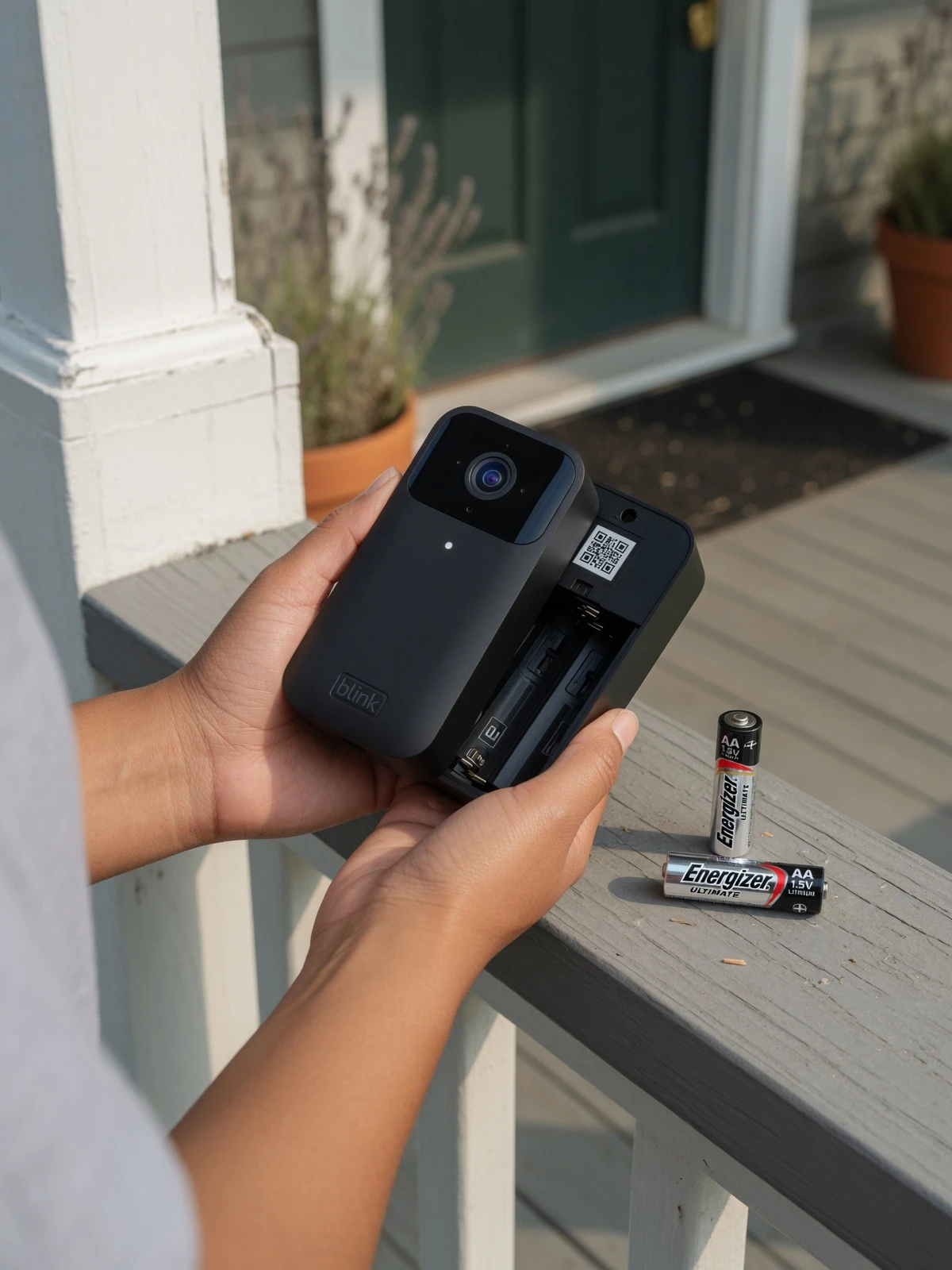
Blink doorbells are engineered from the ground up to run on <strong>1.5V AA lithium cells</strong>, and that specification isn't arbitrary. The device's processor, wireless radio, and motion sensor are all calibrated to draw precise bursts of current that only lithium chemistry can deliver consistently. According to <a href="[https://support.blinkforhome.com/troubleshooting-doorbell/how-do-i-change-batteries-in-my-blink-doorbell](https://support.blinkforhome.com/troubleshooting-doorbell/how-do-i-change-batteries-in-my-blink-doorbell)" target="_blank" rel="noopener noreferrer">Blink Support</a>, using alkaline or rechargeable NiMH batteries is officially discouraged because they cannot supply sufficient current, leading to camera resets and unreliable behavior.
The common mistake is grabbing whatever AA batteries are in the kitchen drawer — standard alkaline cells. They look identical and fit the compartment perfectly, so the assumption is they'll work just fine. In practice, they don't. Voltage delivery degrades under load, causing the doorbell to appear offline in the Blink app, even when the batteries aren't fully depleted.
When Blink defines <strong>"normal use,"</strong> it means approximately 4,000 five-second recording events per year. Under those conditions, a correctly installed set of lithium cells can deliver <a href="[https://www.amazon.com](https://www.amazon.com)" target="_blank" rel="noopener noreferrer">up to two years of battery life</a>. That's the promise — but only if the right chemistry is inside the device. Understanding <em>why</em> lithium outperforms every alternative, especially in cold weather, is where the real story begins.
The Lithium Advantage: Why Alkaline Fails in the Cold
Temperature is the hidden enemy of doorbell battery life — and it's the core reason a <strong>Blink doorbell battery replacement</strong> with alkaline cells often disappoints within weeks.
Alkaline batteries bleed voltage the moment temperatures drop, and a video doorbell reads that drop as a dead battery.

According to Voniko, lithium batteries maintain consistent power from -40°F to 140°F, while alkaline batteries lose significant capacity in cold weather. For a doorbell mounted outdoors, that gap is critical. When an alkaline cell's voltage dips below the device's operating threshold — even temporarily during a cold snap — the Blink app flags the doorbell as offline. The battery isn't actually dead; it's just too cold to deliver stable power. Lithium chemistry sidesteps this entirely by sustaining voltage output across a far wider range.
High Usage alerts in the Blink app are a separate but related signal worth understanding. These alerts appear when the doorbell's activity level exceeds what Blink considers normal — and several factors trigger them frequently:
- Frequent motion events from passing traffic, swaying trees, or pets
- Live view sessions initiated manually through the app
- Two-way audio calls initiated at the door
- Night vision activation in low-light conditions
Each of those events draws a burst of power. On alkaline cells already weakened by cold, those bursts accelerate the voltage drop faster.
One practical approach to extending cell life is dialing back your motion sensitivity settings inside the Blink app. Reducing the sensitivity zone or adjusting the retrigger time between clips means the doorbell captures meaningful events without waking up for every passing car. That translates directly into fewer power draws per day — and noticeably longer intervals between replacements.
Before you can swap the cells, though, you'll need to open the device without damaging it — and that requires knowing exactly where to find the release slot and how to use the opening tool correctly.
How to Safely Remove the Back Cover (With or Without the Tool)
Knowing where to release — not where to pry open — is the difference between a smooth battery swap and a cracked doorbell housing.
Before you can change the battery in a Blink doorbell, you need to get the back cover off without damaging the plastic tabs that hold it in place. That process starts at one specific spot: the release slot at the bottom of the unit.
The release slot is the only safe entry point. According to <a href="[https://www.ifixit.com](https://www.ifixit.com)" target="_blank" rel="noopener noreferrer">iFixit</a>, the release tool must be inserted into this bottom slot to disengage the back cover from the mounting plate. Once inserted and gently twisted, the cover releases cleanly from the bottom and lifts away from the top clip.
- Locate the slot at the bottom edge of the doorbell.
- Insert the Blink opening tool (the small plastic key included in the box) into the slot.
- Twist gently until you feel the cover disengage — no force needed.
- Lift the cover away from the bottom first, then slide it down off the top clip.
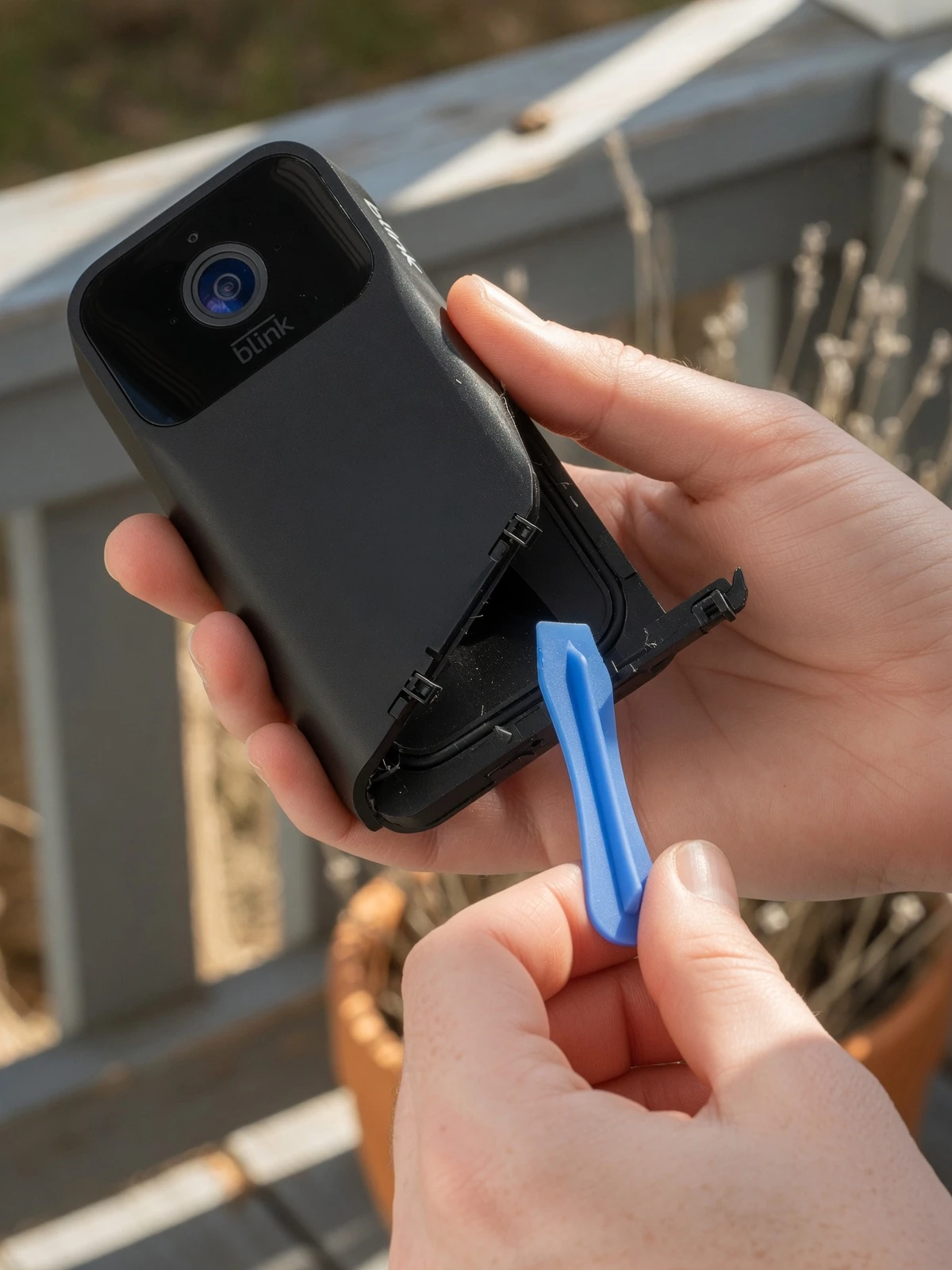
Pro Tip — Lost Your Key? A small flathead screwdriver works as a substitute. Wrap the tip in a thin layer of tape to protect the housing, insert it carefully into the bottom slot, and apply the same gentle twist. Avoid anything wider than the slot opening. The <a href="[https://www.amazonforum.com/s/question/0D5at00000MqCCACA3/how-to-replace-blink-video-doorbell-batteries-without-the-tool-to-open?language=en_US](https://www.amazonforum.com/s/question/0D5at00000MqCCACA3/how-to-replace-blink-video-doorbell-batteries-without-the-tool-to-open?language=en_US)" target="_blank" rel="noopener noreferrer">Amazon community forum</a> confirms this approach works reliably without damaging the unit.
Never pry from the sides. The plastic tabs running along the side edges are not designed to flex under lateral pressure. Forcing a tool between the side seams is the single most common cause of snapped tabs — damage that isn't covered under warranty and makes weatherproofing impossible to restore. Once you have the cover off, you're ready to inspect the battery compartment before dropping in the new cells.
Step-by-Step: Installing the New 1.5V Lithium Cells
Changing batteries in a Blink doorbell takes under two minutes when you follow the right sequence — and skipping any step is where most problems begin.
With the back cover off (as covered in the previous section), work through these four steps before snapping anything back into place:
- Inspect the battery compartment first. Look for moisture or white powdery residue — both signal corrosion from old alkaline cells. A dry cotton swab clears minor residue. If corrosion is heavy, the contacts may need light cleaning with a small amount of isopropyl alcohol before you insert fresh cells.
- Orient the batteries correctly. Match the positive (+) and negative (−) symbols printed inside the compartment. <a href="[https://support.blinkforhome.com/troubleshooting-doorbell/how-do-i-change-batteries-in-my-blink-doorbell](https://support.blinkforhome.com/troubleshooting-doorbell/how-do-i-change-batteries-in-my-blink-doorbell)" target="_blank" rel="noopener noreferrer">Blink Support confirms</a> the Video Doorbell is only compatible with size AA 1.5-volt lithium non-rechargeable batteries — inserting any other type will void performance guarantees and can damage the device.
- Check the gasket seal. Run a finger around the rubber weatherproofing ring on the back cover. A cracked or misaligned gasket lets moisture into the compartment, shortening battery life and risking corrosion — the exact problem you just cleaned up.
- Reattach the cover top-first. Hook the top edge into its slot, then press the bottom firmly until you hear a distinct click. Forcing the bottom before the top is seated causes the housing to misalign.
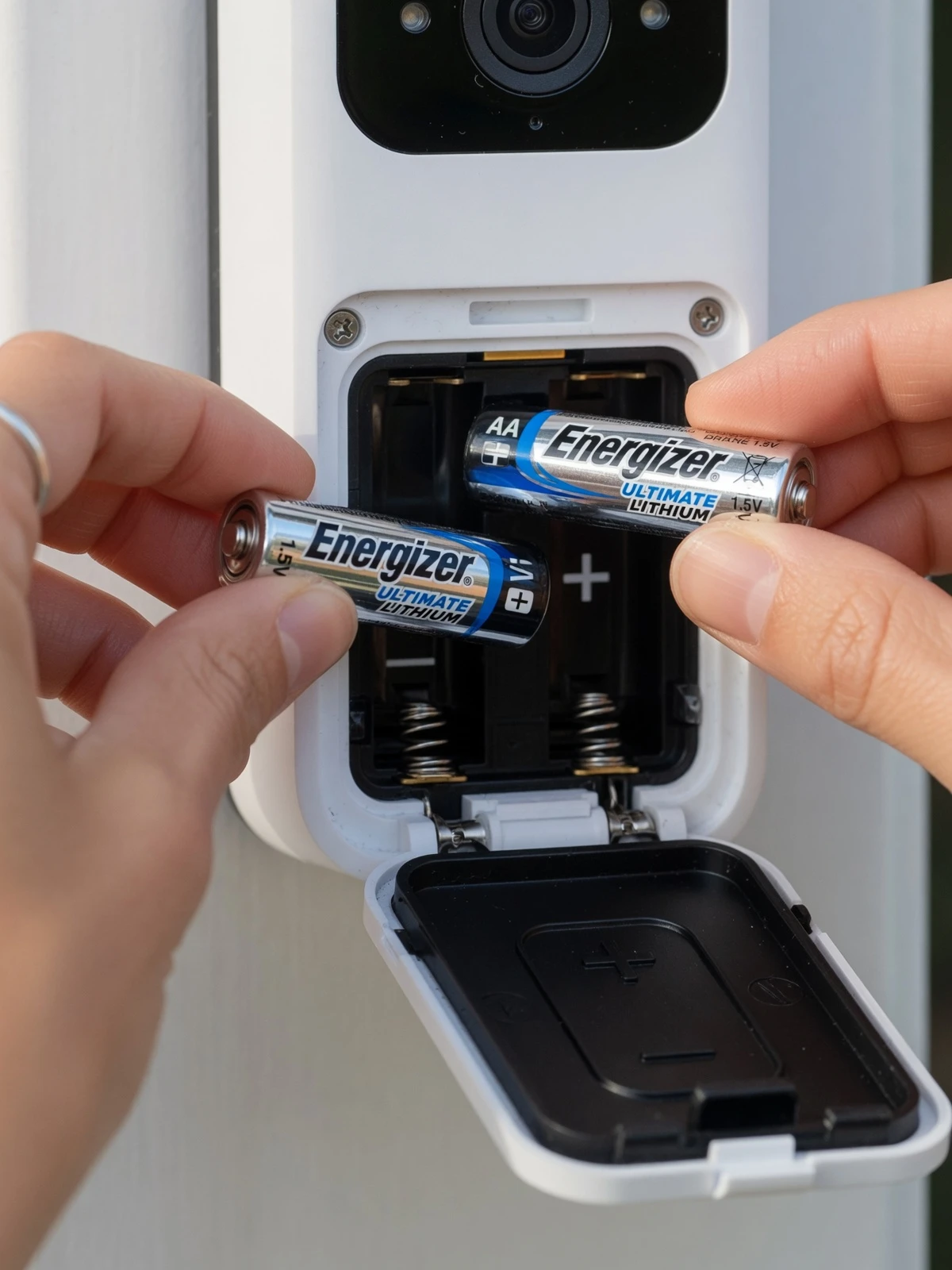
⚠ Important: Never substitute rechargeable AA batteries. The Blink Video Doorbell requires non-rechargeable 1.5V lithium cells only — rechargeable batteries typically output 1.2v, which is insufficient and will trigger low-battery alerts almost immediately.
Even with everything installed correctly, the app sometimes doesn't respond the way you'd expect — and that's where the next section comes in.
Troubleshooting: What to Do if Your Doorbell Stays Offline
Fresh batteries don't always guarantee an instant comeback — knowing the right recovery steps after changing the Blink doorbell batteries saves you from unnecessary frustration.
A doorbell that stays offline after a battery swap is almost always a software handshake issue, not a hardware failure.
Clear the App Alert First. The Blink app may still display a "Replace Battery" warning even after new cells are seated correctly. <a href="[https://support.blinkforhome.com/troubleshooting-doorbell/how-do-i-change-batteries-in-my-blink-doorbell](https://support.blinkforhome.com/troubleshooting-doorbell/how-do-i-change-batteries-in-my-blink-doorbell)" target="_blank" rel="noopener noreferrer">Blink Support</a> notes the app also provides a "High Usage" alert when your motion settings are likely to cause premature drain — so while you're in the app, it's worth reviewing those settings too. Dismiss the warning by opening the device tile, tapping the settings gear, and letting the app refresh the battery status.
Power Cycle Before Assuming the Worst. Remove both batteries, wait a full 30 seconds, then re-insert them. This brief pause clears residual charge from the capacitors and forces the doorbell to re-establish its connection to the Sync Module cleanly. Skipping the wait and immediately reinserting is a common reason the camera appears unresponsive.
Check Sync Module Connectivity. After any power event, the Sync Module itself may need a moment to reacquire the doorbell on the network. Confirm its LED is solid blue and green before concluding the doorbell is faulty.
Factory Reset as a Last Resort. If the doorbell still won't reconnect, locate the small reset button on the back of the unit and hold it for 10 seconds. This wipes the device's network credentials and returns it to setup mode — a clean slate that resolves most persistent offline issues. With those recovery steps covered, a few final takeaways can help you avoid ever landing here again.
The Bottom Line: Essential Battery Replacement Takeaways
Getting this process right comes down to four decisions — and making the wrong one on any of them costs you weeks of reliable performance.
The single most important rule: always use 1.5V AA lithium batteries (non-rechargeable). If you've been asking what kind of battery does the Blink doorbell use, that's the complete answer. Alkaline cells drop voltage faster in cold weather — losing up to 50% capacity in freezing conditions — while quality lithium cells hold near-full voltage even in harsh temperatures, according to <a href="[https://support.blinkforhome.com/troubleshooting-doorbell/how-do-i-change-batteries-in-my-blink-doorbell](https://support.blinkforhome.com/troubleshooting-doorbell/how-do-i-change-batteries-in-my-blink-doorbell)" target="_blank" rel="noopener noreferrer">Blink's official support documentation</a>.
Battery longevity is real but conditional. Blink advertises up to two years of life per set, yet that figure assumes moderate motion activity. High-traffic zones with frequent detections will drain cells significantly faster — which is exactly why monitoring your motion sensitivity settings matters as much as the battery brand itself.
The release tool deserves a dedicated home — a drawer, a utility bag, anywhere consistent. Misplacing it mid-replacement creates unnecessary frustration. A 5mm flathead screwdriver works as a reliable backup, as confirmed by real-world experience shared on the <a href="[https://www.amazonforum.com/s/question/0D5at00000MqCCACA3/how-to-replace-blink-video-doorbell-batteries-without-the-tool-to-open?language=en_US](https://www.amazonforum.com/s/question/0D5at00000MqCCACA3/how-to-replace-blink-video-doorbell-batteries-without-the-tool-to-open?language=en_US)" target="_blank" rel="noopener noreferrer">Amazon community forum</a>.
Finally, the back cover click is essential. A partially seated cover breaks the weather seal and exposes internal components to moisture — one of the fastest ways to shorten your doorbell's lifespan. Press firmly until you feel and hear that audible snap before walking away.
These four fundamentals set the foundation for getting the most out of every battery change — and smart app settings can stretch that lifespan even further.
Maximizing Your New Battery Life with Hyvoxa
Proactive maintenance — not reactive swaps — is what separates a doorbell that performs for two years from one you're babying every few months.
The single most overlooked step after any battery replacement is auditing your Blink app settings for "High Usage" triggers. According to <a href="[https://support.blinkforhome.com/troubleshooting-doorbell/how-do-i-change-batteries-in-my-blink-doorbell](https://support.blinkforhome.com/troubleshooting-doorbell/how-do-i-change-batteries-in-my-blink-doorbell)" target="_blank" rel="noopener noreferrer">Blink Support</a>, high motion sensitivity and frequent Live View sessions are the two primary culprits behind accelerated drain — meaning a fresh set of lithium AAs can still underperform if those settings go unchecked. After installing new batteries, open your Blink app, review your motion sensitivity level, and limit unnecessary Live View sessions to what you actually need.
The broader takeaway is straightforward: replacing Blink doorbell batteries correctly is a one-time skill, but managing battery life is an ongoing habit. Choosing the right battery chemistry gets you in the door. Dialing in your app settings keeps you there.
Hyvoxa is here to make that ongoing process easier. Whether you're troubleshooting a doorbell that won't reconnect, decoding Blink's LED alerts, or comparing smart home device performance, the guides here are built around practical, real-world scenarios — not generic manufacturer copy.
Ready to go deeper? Explore Hyvoxa's comprehensive library of smart home troubleshooting guides to keep every device in your setup running at its best — long after the batteries are in.
Conclusion: Reliability is a Choice, Not a Setting
After troubleshooting dozens of Blink installations and managing my own devices through harsh winters, I can confidently say that reliability isn't a happy accident—it’s the result of using the right fuel. Making the switch to 1.5V lithium non-rechargeable batteries was the single biggest turning point for my setup, taking my maintenance schedule from a monthly headache to a "set it and forget it" routine that actually hits that two-year milestone.
Remember that your Blink doorbell is a high-precision sensor, not a low-drain remote control. By respecting the lithium requirement, handling the back cover with the correct "twist-not-pry" technique, and auditing your app settings for high-usage triggers, you’re protecting your investment. The peace of mind that comes with knowing your front door is actually being monitored is worth the extra few dollars for the right batteries.
Conclusion: Reliability Starts with the Right Power
As someone who has reviewed and installed dozens of smart security systems, I’ve seen every mistake in the book. The most common is the one I made early on: assuming all AA batteries are created equal. They aren't. Your Blink doorbell is a high-performance tool that demands a specific fuel—1.5V lithium cells.
By applying these insights—from the lithium-only rule to the precise motion sensitivity adjustments—you're moving from a reactive owner to a proactive one. This approach has kept my own systems running without a single dropped connection for over two years. Stick to the specs, treat the hardware with care, and your doorbell will provide the peace of mind you bought it for in the first place.